Set it up with AI
The best way. It checks your TV and talks you through it.
Before you start
- You get couch-tv as your TV’s home, and the phone remote if you want it.
- You need a computer on your home Wi-Fi with Claude Code or another coding agent.
- Google TV, Android TV and Fire TV get the full home, Home button included. On Fire TV, Amazon’s home flashes up first.
- Samsung, LG and other TVs work too, but the computer stays on at home and their own Home button still opens their own menu.
-
Step 1. Open Claude Code on a computer on your home Wi-Fi
More help
Claude Code, or any coding agent that can read a folder and run commands on your computer. The TV needs to be switched on and on the same Wi-Fi.
A Mac or Linux computer works best. On Windows it can still put the app on the TV, but it cannot be the computer at home that Samsung, LG and others need.
It may need Python 3.11 or newer. It asks before it installs anything.
-
Step 2. Paste this and press Enter
> Set this up on my TV:
github.com/Seagey/couch-tvSet this up on my TV: github.com/Seagey/couch-tvMore help
It reads the repo's own instructions (AGENTS.md), so you don't have to. Already have the couch-tv folder? Open it in your agent and say
set this up on my TV
. -
Step 3. Answer a few questions: who watches, the look, your apps
I can see Living Room TV. Is that the one?
Yes
Who watches this TV?
Sam and Alex
More help
It finds your TV on the Wi-Fi and checks what it can run. Then it asks which way you want it (just the home screen, or the phone remote too), the names for each person, the look and which apps go first.
It never asks for your Netflix or other passwords. You sign in to those yourself, on the TV.
-
Step 4. It reads the plan back. Say yes
Here's the plan: Living Room TV, the five scenes, Netflix and YouTube first.
Ready for me to set it up? You can undo all of it.
Yes
More help
Nothing on the TV changes before your yes. It never switches off or deletes the TV's own home screen, and it shows you how to undo it before it starts.
-
Step 5. On the TV, press Allow when it asks
Allow USB debugging? Always allow from this computer CancelAllowMore help
First it walks you through switching on Developer options with the TV remote: Settings, System, About, then press Build seven times.
Never press OK on Revoke USB debugging authorizations. It sits right above Wireless debugging.
A Samsung or LG asks you to press Allow or Accept once too.
-
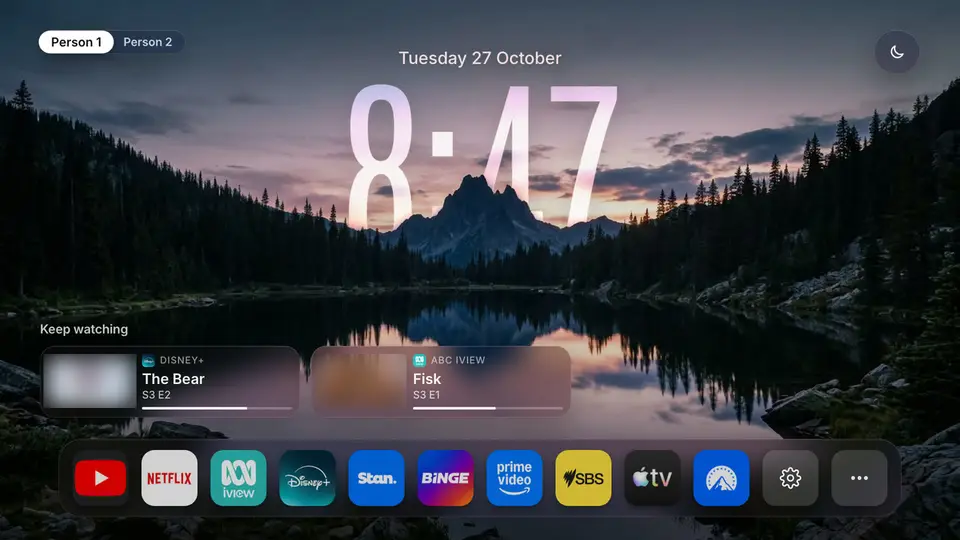
Step 6. Press Home. That's your new home
More help
It checks it with you: Home, two apps, and the phone remote if you chose it. Then it shows you how to move apps around and how to undo it.
Samsung, LG, Roku and other TVs
They don't run Android apps, so couch-tv goes on as an app or page that the computer at home opens every time the TV comes on. It can be a Mac, a Linux box or a Raspberry Pi.
Hisense VIDAA, Philips, Panasonic, VIZIO, Fire TV on Vega OS and Apple TV are Beta. Check your TV for its answer.
Rather do it by hand?
Google TV or Android TV: set it up from your phone or with the Setup app. Every step for every TV is in the README.
Changed your mind later? Remove it in a minute. Nothing on the TV is deleted.