Questions people ask
The ones that come up most in the comments and DMs, answered from the couch-tv docs.
Which way should I set it up?
With AI if you have a computer: it checks your TV and walks you through, on any TV couch-tv runs on. No computer? From your phone on a Google TV or Android TV. Want no AI? The free Setup app for Mac or Windows.
Is it free?
Yes. couch-tv is free and open source (MIT licence), and so is the Setup app. There is nothing to buy and no subscription.
Do I need AI, or a paid Claude plan?
No. AI is the easiest way, but the phone steps and the Setup app use no AI at all. If you use AI, the repo's instructions work with Claude Code or any coding agent that can read a repo and run commands.
Can I use ChatGPT, Gemini or Copilot instead of Claude?
The setup instructions in the repo work with any coding agent that can read the folder and run commands on your computer. The optional "ask for a show" assistant on the TV is Claude: your own Claude plan on a computer at home, or your own API key in the TV app.
Is there an APK, or an Android app?
Yes. The Couch TV app goes straight onto the TV with the free Downloader app: type the code 8180170 and press Load (some versions say Go), or couchtv.sites.underseage.studio/get. The phone steps walk you through it. Both TV apps are also on GitHub Releases.
Do I need a computer?
Not for Google TV and Android TV: set it up from your phone. With a computer, AI is easier. A Fire TV stick needs a computer once. Samsung, LG, Roku and the other TVs that don't run Android need a computer at home that stays on (a Mac, a Linux box or a Raspberry Pi), because it opens couch-tv every time the TV comes on.
I only have a Windows PC. Can I still do it?
Yes. The Setup app runs on Windows 10 and 11, and the phone way needs no computer at all. The computer that stays on for Samsung and LG is a Mac, a Linux box or a Raspberry Pi; the repo also has a Docker example for it.
Which TVs does it work on?
Google TV, Android TV and Fire TV run the full thing. Samsung and LG run it as an app with a computer at home, and more TVs have beta paths, Apple TV included: its phone remote and a Couch TV home app. Type your TV into the check for its answer. Quickest check of all: on the TV open Settings, System, About. "Android TV OS" there means it works.
I have a Sony Bravia. How do I do it without AI?
Most Bravias since 2015 run Google TV or Android TV, so the phone steps and the Setup app both work, with no AI. A few cheaper Full HD Bravias run Sony's own system instead: Settings, About tells you which you have.
Can I go back to the normal Google TV home?
Any time. couch-tv never switches the Google TV home off, so it is still there behind it. Removing couch-tv takes a minute, and the Google TV home comes straight back.
Can I limit what my kids see?
Yes, if you want it. It's off until you set it up. Pick the shows and apps for their profile, choose a PIN, and their home shows only those. Inside an app they can still browse that app, so use its own kids profile too.
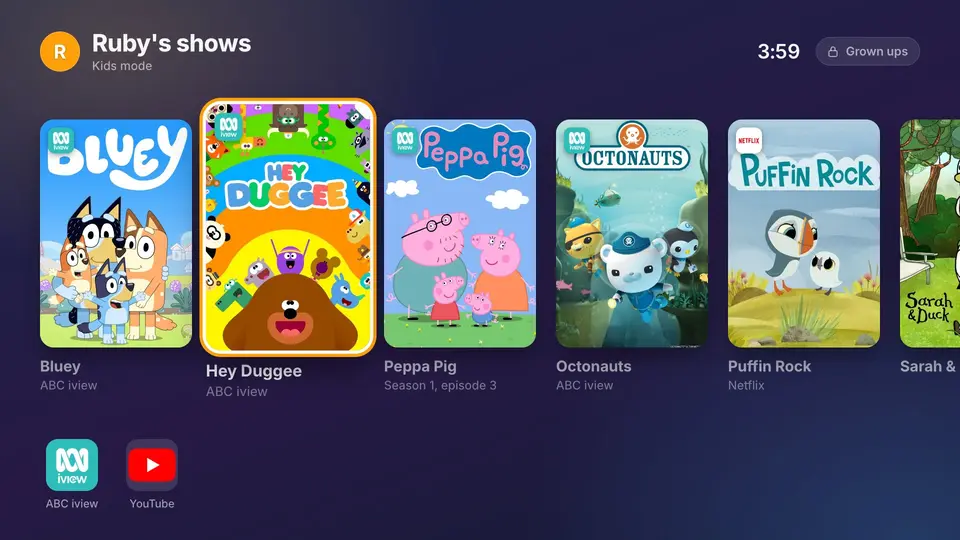
How do I set up kids mode?
Say yes when setup asks about kids, or later from the phone remote (TV, Kids mode). Without the phone remote, it goes in config.json.
Which TVs have kids mode?
Google TV, Android TV, Fire TV, Samsung, LG and the Beta browser TVs. Apple TV too (with the Couch TV app). Not Roku yet. It's on GitHub now and comes in the next release.
Is it safe? Will it break my TV?
Nothing couch-tv does deletes anything from your TV. It never switches off or removes the TV's own home or setup app, so the TV always has them when it starts. The Setup app checks every download against its checksum, and nothing changes on the TV until you say yes. All the code is open on GitHub for anyone to read.
Will it slow my TV down?
On a small or slow TV stick, switch on Lighter home in Home settings, and leave glass panels and the video background off: they are the heavy parts. Turning off Moving tiles helps too if the focused tile flickers.
Does it work away from home?
The phone remote works on your home Wi-Fi. The phone and the TV need to be on the same network. To reach it from away, use a private network (a VPN) to your home; never open a port on your router to it.
Does it collect my data?
No accounts and no tracking. Your settings stay on the TV, and with a computer at home, on that computer. It only goes online for what you'd expect: the weather (Open-Meteo), where a show streams (JustWatch), song covers for Now playing, and update checks on GitHub if you switch them on.
How do updates work?
Updates are off until you say yes. Switch on Tell me about new versions in Home settings, Updates, and the TV looks on GitHub once a week; Update to... downloads the new version and Android asks before installing it. Your settings, people, photos and apps stay. You can also install the new app again from the short link.
How do I remove it?
Each way of setting it up has its own quick undo. See Remove it. With AI, just ask it to take couch-tv off your TV.
Got an Airbnb or holiday home?
Have a look at guest-tv: a welcome screen and guest remote for holiday rentals, on the same TVs as couch-tv. Its app goes on the TV from couchtv.sites.underseage.studio/guest in Downloader.
How can I support it?
Shout Josh a coffee, star it on GitHub, follow along on Instagram or TikTok, and tell us how it went on your TV on the issues page.